Introducing the
Micro64

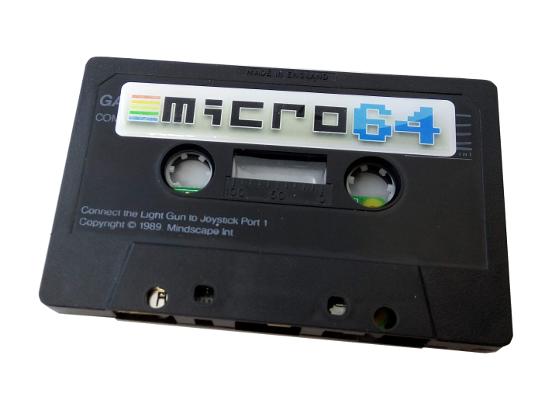
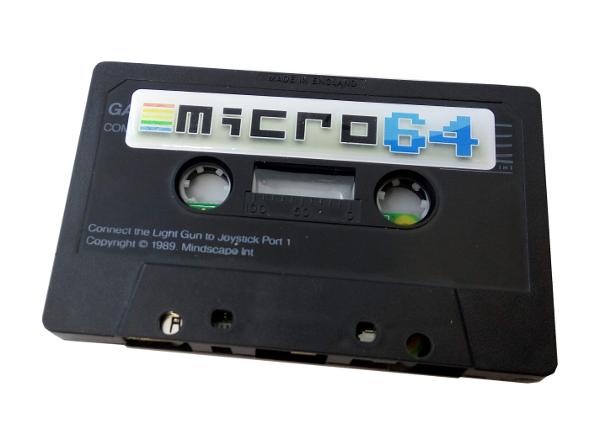
Possibly the most awesome looking Commodore 64 Ever! Developed and fitted into a refurbished original C64 game cassette!
- - The Micro64 is the most powerful of recently released C64 rehashes.
- - The Micro64 is fitted with HDMI output and 2 USB ports for Keyboard and Joypad.
- - Powered by a standard USB cable, the same you'd use for your phone!
- - A massive 16GB of internal storage
- - Further games (.d64 files) can also be added.
The Micro 64 is pre-installed with 256 of the very best Commodore 64 games ever released.
AWESOME GAMES!
Micro64
Included:
- Limited Edition Packaging
- Micro 64 console with 16GB storage
- Switchable USB Power cable
- Mini HDMI to HDMI cable
- 2/4 Port USB hub/splitter
- Quick start user-guide
Optional Extras:
- Arcade joypad
- Stylish bluetooth / wireless keyboard
USER GUIDE
Micro64

Lets Go! - The slightly more detailed ‘how to’ guide for the Micro64
Connecting up your Micro 64.
- Connect the Micro USB Hub/Splitter to the left Micro USB port of of your new console.
- Connect your Joypad and Keyboard Bluetooth Dongles to the two available USB ports.
Note: These devices are partially charged and only work wirelessly with the Micro64.
- Connect HDMI cable to TV
- Connect the Micro USB Power cable to right micro USB port) and then connect it to a USB power source such as Smart TV, Phone charger etc.
The power cable should come fitted with a handy on/off button, but it is preferential to use the shut-down option when you can. (details below).
We have pre-configured the Micro64 to be setup for our joypad, and added hotkeys to make starting games easier, but you can use your own if you prefer… See below for details.
The Micro 64 will take around 10 seconds to boot (Far quicker than loading an original C64 game!).
Do NOT remove or insert Joysticks or USB peripherals whilst powered on. This may damage your machine.
Important.
- Ensure all peripherals are connected before powering up your Micro 64
- If using wireless controller, ensure you "sync" the device to the receiver as soon as possible whilst the Micro64 is booting up.
Use of a keyboard is highly recommended (any Bluetooth keyboard with USB dongle should work just fine)
Accessing the main menu.
At anytime just press F8 on your keyboard or press the SELECT button on our pre-configured joypad to go to the main menu.
Loading a game.
Loading a game is simple, you can use the joypad or a keyboard.
Turn on your joypad by pressing the home-button, then press START on the joypad to access the ‘Autostart Image’ option, Choose either CARTS or GAMES, The main fire-button [3] then selects the file to load.
Note: CRT files load instantly whist D64 files load at the real speed of Commodore 64 disk based games.
Games can be found in root/combian64/games
Note: If you load a cartridge, it’s the same as inserting a physical cartridge into a real C64, so you will have to ‘remove it’ before loading a D64 game, Loading another CRT game will be fine. Just access the main menu then: Cartridge > Destatch cartridge image
Please note: Many games are compressed and as such will show gobbly-gook on-screen whilst loading/decompressing.
Using the pre-configured joypad
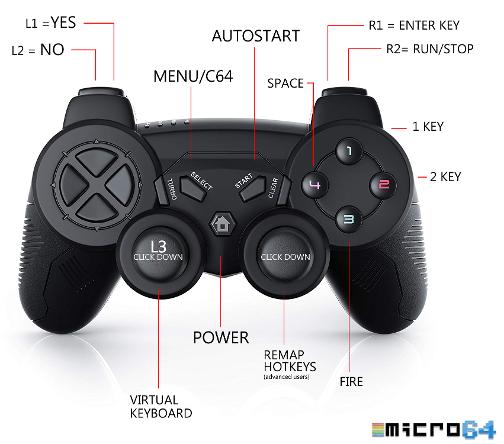
We have configured the use of most buttons on our optional PS3 style joypad.
The two main buttons are SELECT and START, these will allow you to access the main C64 screen, the main menu and the auto-start feature. We have also configured the most popular keyboard commands on may of the other buttons, such as space-bar, enter, run/stop, yes/no, and even a quick access button for the virtual keyboard option.
Important: the remap-joypad option should only be used by experienced users, one false move and you will re-assign buttons and make life more confusing than it already is! If you make a mess of things, just unplug the Micro64 and reboot, and life should be good again.
Using other joypads.
Your Micro 64 is pre-configured to work with our optional joypad and should require no additional configuration. We have also thoroughly tested a number of 3rd party USB joypads, all seem fine, but there may be some that do not work correctly. Xbox360 wired is verified working along with many “retro” joypads but we can’t guarantee all makes and models will work.
HINT: If after "pairing" your controller to the Wireless USB adaptor, your joypad pails to work, try rebooting the Micro64.
Configuring another joypad requires the use of a keyboard. Goto the main menu [F8] and select Machine Settings>Joystick settings>Joystick 2 mapping.
Using your keyboard, select “up” and press up on your joypad and continue down the list until you’ve configured all direction buttons and the fire button.
It is possible to assign hotkeys to your own joypad, this is for more advanced users and you can access a how-to video from the internet.
Hotkey setup : Settings>Joystick settings>Extra joystick options
Most C64 games use joystick port 2 but on the rare occasion a game uses port one, Simply enter the main-menu and select ‘Swap joystick ports’
Don’t forget to save your new joypad/keymap settings.
If using your own joypad, saving the settings is important as every time you load up the Micro64 you will need to remap your joypad - Just go to the main-menu [F8 or SELECT] and access Settings Management >Save Joystick Map and also >Save Keymap
What if a game needs the keyboard and you have not got one.
Use our pre-configured joypad, press down L3 to goto the Virtual Keyboard, use the joypad to move around and select the key you wish with the main fire-button, when you have finished select the X (top left) to exit the on-screen keyboard.
Featured games.
From time to time we may add or remove a game or two as we continue to enhance the Micro64. Although we have thoroughly tested the Micro64, we make no guarantee every game will work.
Shutting down your Micro 64.
It is recommended to ‘shut down’ the Micro64 other than just turning off.
Enter the main menu using F8 on the keyboard. Select Quit Emulator then using your keyboard select Shutdown. If not, there’s a small chance you’ll damage your Micro 64.
MICRO 64 VIDEO
GUIDES
Here you'll find a few useful and super quick video guides on using the Micro64.
looking for a
Micro64?
Visit ami64.com for availability or flps.co.uk/micro64 for more information. Only 100 made, so stock is limited.